Choose the work.
Pick your Odoo project and task. Use favourites and recent work to get started sooner.
Your native Odoo timesheet app
A quick job. A client call. The work between appointments. Record project time while it’s fresh, wherever your working day takes you.
Start a timer or add time manually against your Odoo projects and tasks. Keep favourites and recent work within reach.

Australian made. Built around real Odoo work.
No custom Odoo module required.
The native difference
Choose a project, start a timer or record time manually in dedicated app screens. Supported widgets, Live Activities and Mac menu-bar access keep running time close.
Available features and device integrations vary by platform.
Your working day, made easier
Pick your Odoo project and task. Use favourites and recent work to get started sooner.
Start a timer as you go, or enter time manually when the work is already done.
See running time on supported widgets and device surfaces, then review your timesheets in Odoo.
A timer, closer to hand
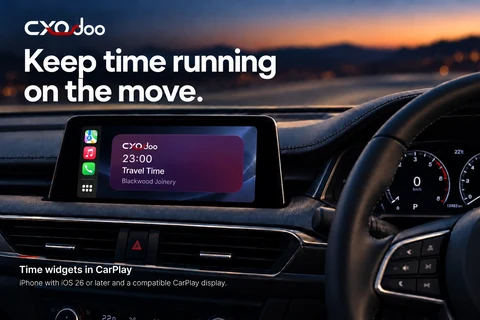
Keep running time visible with CXOdoo widgets on a compatible CarPlay display.
Back at your desk, supported widgets, Live Activities and Mac menu-bar access help keep the timer close to the work.
Device features vary. CarPlay widgets require iPhone with iOS 26 or later and a compatible display.
A moment in your day
A project question turns into a useful piece of work. Start a timer against the project, or enter the time afterwards if the call caught you by surprise.
Your project and task context stays connected to Odoo, ready for your normal timesheet review.
Explore time tracking for your team →A few useful answers
Yes. CXOdoo supports manual time entry as well as running timers against accessible Odoo projects and tasks.
Yes. The projects and tasks available to you depend on your Odoo environment, selected company and user permissions.
CXOdoo widgets can keep running time visible on a compatible CarPlay display. Requires iPhone with iOS 26 or later. This does not imply a standalone CarPlay app or interactive controls.
Sign in to the same CXOdoo account to synchronise eligible licences across supported platforms. Available features, purchasing routes and eligibility vary.
Your next working day starts here
Connect your compatible Odoo workspace. Start with free Contacts.
Explore eligible trials of Contacts+, Receipts and Time in the app.
Optional features are paid. Plans, trials, compatibility and device features vary.
See the app and official store listing for current details.