Get to know Odoo.
Explore the business applications and choose an Odoo environment that fits your organisation.
Considering Odoo?
Looking for a better way to manage work, contacts and the paperwork that comes with them? Get to know Odoo, and the app that brings everyday tasks closer.
Odoo is your business system. CXOdoo connects to it for contacts, receipt capture and project time on supported Apple and Android devices.

Australian made. Built around real Odoo work.
No custom Odoo module required.
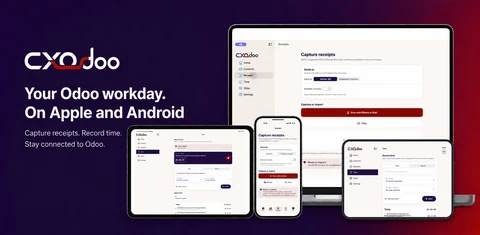
The native difference
Odoo gives you broad access to your business applications. CXOdoo adds dedicated native screens for selected everyday workflows, with familiar controls and supported device features.
Available features and device integrations vary by platform.
Your working day, made easier
Explore the business applications and choose an Odoo environment that fits your organisation.
Confirm compatibility, user access and the Odoo workflows you want to use with CXOdoo.
Download CXOdoo, connect your workspace and start with free Contacts. Add the optional features that help.
Two parts of one working day
Your business applications, records and processes. Odoo controls user access and the workflows your organisation uses.
Odoo offers its own web and mobile experiences. Choose the applications and environment that fit your business.
Get to know Odoo ↗Contacts, contact context, receipt capture and project time, close to hand on supported Apple and Android devices.
Connect to a compatible Odoo workspace. No custom Odoo module is required for the standard workflows.
Explore the everyday workflows ↓You need an Odoo environment to use CXOdoo. Odoo access and licences are separate from CXOdoo subscriptions.
Web access and native apps, explained
Odoo recommends its browser-based progressive web app and also offers store apps that combine Odoo Web with native device components. CXOdoo provides dedicated native screens for selected everyday tasks.
Use Odoo’s interface across your business applications, including the workflows and customisations available in your environment.
Device integrations are available through supported browser and store-app features.
Find and save contacts, capture receipts and record project time through purpose-built native app screens.
Use familiar device controls and supported timer surfaces, including widgets, Live Activities and Mac menu-bar access.
CXOdoo complements selected workflows. The full Odoo environment remains available for wider business tasks. Odoo’s mobile options ↗ · Odoo’s mobile architecture ↗
What could that look like?
Find a contact and use Contacts+ to review accessible conversation and work context.
Explore Contacts & Contacts+ →Capture the receipt for a draft Vendor Bill or Employee Expense, ready for review in Odoo.
Explore receipt capture →Start a project timer, or add time manually when you’ve finished the task.
Explore time & timesheets →A few useful answers
No. CXOdoo connects to a compatible Odoo environment. It is not a standalone accounting, contact management or timesheet service.
No. Odoo access and any Odoo licences are separate from CXOdoo’s optional feature subscriptions.
A native companion for everyday contact access, Contacts+ context, receipt capture and project time on supported devices. Odoo already has its own web and mobile experiences; choose the workflow that suits you.
CXOdoo’s standard workflows do not require a custom module or modifications to your Odoo environment. Compatibility and the right user permissions are still required.
Your next working day starts here
Connect your compatible Odoo workspace. Start with free Contacts.
Explore eligible trials of Contacts+, Receipts and Time in the app.
Optional features are paid. Plans, trials, compatibility and device features vary.
See the app and official store listing for current details.